Posts with Topic: Tech Tips Archives - Page 7 of 8 - Modern Pen
Launching Hangouts
January 13, 2014
Tags: Chat, Google Apps, Hangouts
UPDATED 19 January 2014–Additional directions have been added to demonstrate how to enable Hangouts from Google Chat within Gmail as well as how to revert back to Google Chat from Hangouts. Since School District 21 launched Google Apps in June 2013, staff members have had access to Google Chat, including text chat, audio chat, […]
WeVideo: Edit video in the Cloud
March 3, 2014
Tags: Chrome, Chrome Apps, Chromebook
WeVideo is the premier Chrome video editing suite. WeVideo videos are stored in one’s Google Drive, and the user can have up to 5 GB of WeVideo videos. To launch WeVideo the first time, it must also be connected to one’s Google Drive. WeVideo currently has free and paid services. At this time, School District […]
Lucidchart: Organize your thoughts
March 3, 2014
Tags: Chrome, Chrome Apps, Chromebook
Lucidchart for Education is a diagramming/flowchart app for Chrome OS that is a counterpart to apps like Inspiration, which School District 21 began using in the Late 1990s, and Visio, a Microsoft application that is used by an engineers to lay-out technical solutions, workflows, and solution-oriented processes. Lucidchart currently offers their Chrome app package free […]
Lucidpress: Make engaging documents
March 3, 2014
Tags: Chrome, Chrome Apps, Chromebook
Lucidpress is a publishing application for Chrome. Using Lucidpress, pre-created templates can be used to create beautiful newsletters, signs, and other publications. Lucidpress connects to your Google Drive, and all of your Lucidpress files are saved to your Google Drive. At this time, Lucidpress is free for use by schools. This may change at any […]
New copiers I Scan & send
July 31, 2014
Tags: Copier, Email
This summer, School District 21 replaced the existing Océ copiers in all of the schools with new Canon copiers. These copiers include the same functionality as the previous copiers with an even simpler interface. Photocopies Making photocopies can simply be done by clicking the “Copy” button on the touchscreen that is pictured further down […]
Streaming video changes
August 9, 2014
Tags: Images, Instruction, Media, Movies, Music, Policy, Streaming, Video
School District 21 is constantly evaluating changes in technology and how those can be leveraged to help students and teachers do more and increase student learning. Decisions about improvements and changes include listening to a wide variety of stakeholders and looking at best practices in other leading school districts as well as the results of […]
Securly–CCSD21’s New Web Filter
August 9, 2014
Tags: Chrome, Chromebook, Digital Citizenship, Filter, Internet
For over a decade, federal law has required that schools that receive E-Rate funding, which helps offset the cost of telecommunications services, including the Internet, maintain a web filter. School District 21 has always complied with this legal requirement. As technology has advanced, School District 21 has continued to make changes to the filter in […]
Google Classroom in Authentic Learning
August 17, 2014
Tags: Authentic Learning, Google, Google Apps, Google Classroom
An Authentic Learning unit delivers the curriculum to students in a meaningful and engaging manner by challenging them to solve a real problem with a real product that serves a real audience. Authentic Learning units prepare students for the world of today and tomorrow by requiring collaboration, creativity, and communication. Additionally, successfully solving such problems […]
New Tools for Staff
August 23, 2014
Tags: Lenovo, Staff Laptop, ThinkPad Yoga
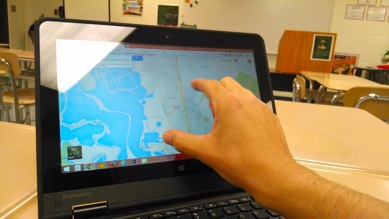
Notice the touch screen? Great possibilities for learning & assessment! Long, early process Beginning last fall, School District 21 worked with vendors to identify a wide range of potential devices to replace the current staff laptops, which have successfully completed their planned four-year lifespan and are ready to be replaced. With over 20 models […]
New Staff Laptops–Files in Google Drive
September 21, 2014
Tags: Google Drive, Lenovo, Staff, Staff Laptop, Staff MacBook
The key element in this transition is that, at this point, all staff members should have moved their files to Google Drive and should be working in Chrome for everything from email and chat to word processing and spreadsheets. Moving forward, as determined by the staff committee during the 2012-2013 school year, staff laptops will […]

Each District 21 school is named after an American author, and learning and literacy is at the center of our Professional Learning Community. The Modern Pen provides a collaborative location in which District 21 teachers can come together to learn the skills that will enable their students to learn new skills and to understand concepts at an even different level than before.
 Preparing all students for success