Securly–CCSD21’s New Web Filter
August 9, 2014
Tags: Chrome, Chromebook, Digital Citizenship, Filter, Internet
For over a decade, federal law has required that schools that receive E-Rate funding, which helps offset the cost of telecommunications services, including the Internet, maintain a web filter. School District 21 has always complied with this legal requirement. As technology has advanced, School District 21 has continued to make changes to the filter in […]
Google Classroom in Authentic Learning
August 17, 2014
Tags: Authentic Learning, Google, Google Apps, Google Classroom
An Authentic Learning unit delivers the curriculum to students in a meaningful and engaging manner by challenging them to solve a real problem with a real product that serves a real audience. Authentic Learning units prepare students for the world of today and tomorrow by requiring collaboration, creativity, and communication. Additionally, successfully solving such problems […]
New Tools for Staff
August 23, 2014
Tags: Lenovo, Staff Laptop, ThinkPad Yoga
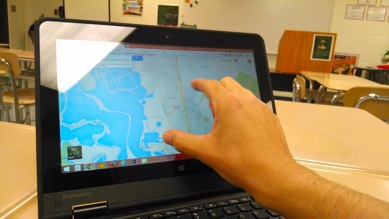
Notice the touch screen? Great possibilities for learning & assessment! Long, early process Beginning last fall, School District 21 worked with vendors to identify a wide range of potential devices to replace the current staff laptops, which have successfully completed their planned four-year lifespan and are ready to be replaced. With over 20 models […]
New Staff Laptops–Files in Google Drive
September 21, 2014
Tags: Google Drive, Lenovo, Staff, Staff Laptop, Staff MacBook
The key element in this transition is that, at this point, all staff members should have moved their files to Google Drive and should be working in Chrome for everything from email and chat to word processing and spreadsheets. Moving forward, as determined by the staff committee during the 2012-2013 school year, staff laptops will […]
New Staff Laptops–Getting Ready!
September 21, 2014
Tags: iMovie, iPhoto, iTunes, Movies, Music, Pictures, Staff, Staff Laptop, Staff MacBook
At the conclusion of the 2013-2014 school year, staff members were updated on the process of replacing their staff laptops. With the start of the 2014-2015 school year, the new staff laptop was announced. With the laptops now shipping to the United States, it is time for final technical preparations. While the Information Services […]
New Staff Laptops-What to Expect
October 14, 2014
Tags: Lenovo, Staff, Staff Laptop
With the new staff laptops about to be distributed, this post provides an overview of what staff members can expect during the distribution process. Multiple days for each staff member! Each staff member will participate in two days of transition to her or his new laptop. (We anticipate that the Info Services team will be […]
Skyward Employee Access
December 10, 2013
Tags: Direct Deposit, Employee Access, Paycheck, Skyward, W2
Along with Google Apps for Education and PowerSchool, Skyward, the District’s Human Resources & Finance software package, is one of the three most important software systems in place in School District 21. Skyward has been used by Gill Administration Center staff members for many years, and a couple of years ago, secretaries and principals in […]
Tax Time: Accessing your W2 through Skyward
November 10, 2014
Tags: Skyward, Staff
At the end of each calendar year, like all businesses and organizations in the United States that employ people, School District 21 must produce a W2 form. The W2 provides a summary of one’s financial records from the year for income tax purposes. In previous years, employees received paper copies of their W2 Form. Now, […]
Lenovo ThinkPad Yoga-Playing a DVD in Windows 8.1
November 13, 2014
Tags: DVD, Lenovo, Projector, Staff, Staff Laptop, Windows
Nearly all of the machines reviewed by the Staff Laptop Committee no longer included a CD/DVD drive. In our personal lives, many of us only watch and listen to digital audio and video content without the use of any physical media. The same will be true at school, though it may take schools, and their […]
Printing your W2 from Skyward
January 22, 2015
Tags: Skyward
To access your W2 Form, first login to Skyward. After you’ve logged in to Skyward, click on Employee Information as pictured below. Then, under the “Payroll” section, click on the “W2 Information” link as pictured below. To generate a PDF of your W2, click the “View W2” button on the right side of the screen. […]

Each District 21 school is named after an American author, and learning and literacy is at the center of our Professional Learning Community. The Modern Pen provides a collaborative location in which District 21 teachers can come together to learn the skills that will enable their students to learn new skills and to understand concepts at an even different level than before.
 Preparing all students for success